Featured project

DevData Generator

Browser-based fake data generator that creates one reusable dataset and exposes the same result through table, JSON, CSV and SQL outputs.

Runs entirely in the browser; no backend or database is required.

Overview

DevData Generator is a browser-based tool for configuring realistic fake datasets and reusing one generated result across table, JSON, CSV and SQL outputs.
Product

How the product works

A compact view of configuring, generating, inspecting and reusing one dataset.

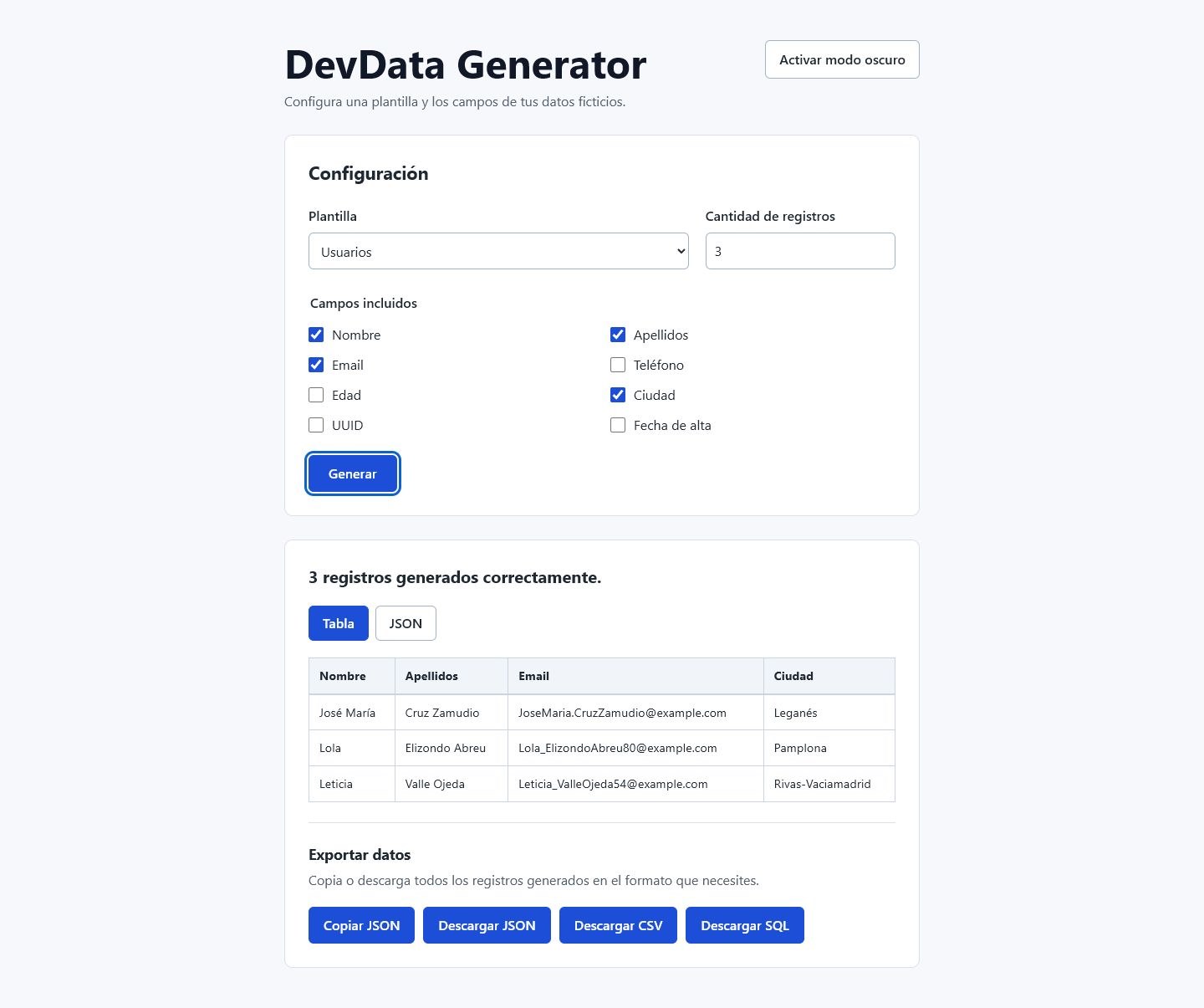
DevData Generator configured with the Users template and three generated records shown in a table.
The real DevData interface connects dataset configuration, generation, preview and export in one workflow.

Configure dataset

Choose template, fields and number of records.

Generate

Create the configured fake records.

Generated dataset

The records produced from the current configuration.

Inspect result

View the same records as a table or JSON.

Reuse result

Copy or download the generated records as JSON, CSV or SQL.

System

How the same flow is structured

Open the product flow to inspect the state, generation boundary and downstream consumers beneath it.

Configure dataset

Input state

Configuration state

Holds selected template, fields and record quantity.

Relationships
Flows to
  • Validation
Invalidates
  • generatedData
Implementation notes
  • App coordinates the shared workflow state.
  • No Redux or other global state library is used.

Generate

Process

Validation

Checks quantity and whether at least one field is selected.

Relationships
Receives from
  • Configuration state
Flows to
  • generateData()
Process

generateData()

Creates the configured records using the generator associated with the selected template.

Relationships
Receives from
  • Validation
Depends on
  • Faker
Produces
  • generatedData
Dependency

Faker

Provides fake values used by generation.

Relationships
Used by
  • generateData()
Sourcesrc/utils/generateData.jsGeneration stays behind one utility boundaryView evidence
import { fakerES as faker } from '@faker-js/faker'
export function generateData({
  templateId,
  selectedFields,
  numberRecords,
}) {
  const generateRecord = recordGenerators[templateId]

  return Array.from({ length: numberRecords }, (_, index) =>
    generateRecord(selectedFields, index),
  )
}

The utility imports Faker, selects the configured record generator and creates the requested records through generateData().

Generated dataset

Shared state

generatedData

Stores the current generated records as the shared result of one generation.

Relationships
Produced by
  • generateData()
Consumed by
  • Preview
  • Export
Invalidated by
  • Configuration state
When
  • Template changes
  • Selected fields change
  • Quantity changes
Why it matters
  • All visible and downloadable outputs represent the same generation.
Sourcesrc/App.jsxConfiguration changes clear the shared resultView evidence
setSelectedTemplate(templateId)
setSelectedFields(newTemplate.fields.map((field) => field.id))
setGeneratedData([])
const handleFieldChange = (fieldId) => {
  setSelectedFields((currentFields) =>
    currentFields.includes(fieldId)
      ? currentFields.filter((id) => id !== fieldId)
      : [...currentFields, fieldId],
  )
  setGeneratedData([])
}
const handleNumberRecordsChange = (value) => {
  setNumberRecords(value)
  setGeneratedData([])
}

Template, selected-field and quantity handlers each clear generatedData after changing configuration.

Inspect result

Consumer

Preview

Presents generatedData as Table or formatted JSON.

Relationships
Receives from
  • generatedData
Implementation notes
  • Table preview and JSON preview consume the same generatedData.

Reuse result

Consumer

Export

Routes generatedData into copy and download transformations.

Relationships
Receives from
  • generatedData
Flows to
  • Output serializers
Serializer

Output serializers

Transforms generatedData into JSON, CSV or SQL output.

Relationships
Receives from
  • Export
Flows to
  • Browser APIs
Implementation notes
  • JSON preview, copy and download reuse the same JSON serializer.
  • CSV and SQL use dedicated serializers.
  • SQL output is downloaded as INSERT statements; it is not executed.
  • The app has no database.
Platform

Browser APIs

Handles clipboard and file downloads in the browser.

Relationships
Receives from
  • Output serializers
Implementation notes
  • File download uses browser-native APIs.
OutputIllustrative Users recordOne result, three serialized representations

Illustrative data, not a recorded execution

JSON

[
  {
    "nombre": "Ana Torres",
    "email": "[email protected]"
  }
]

CSV

"nombre";"email"
"Ana Torres";"[email protected]"

SQL

INSERT INTO usuarios (nombre, email) VALUES ('Ana Torres', '[email protected]');

The same illustrative record is shown as JSON, semicolon-delimited CSV and a downloadable SQL INSERT statement.

System flow

  1. Configuration stateValidation
  2. ValidationgenerateData()
  3. FakergenerateData()
  4. generateData()generatedData
  5. generatedDataPreview
  6. generatedDataExport
  7. ExportOutput serializers
  8. Output serializersBrowser APIs

Separate invalidation rule

Configuration stateInvalidates when configuration changesgeneratedData

Related technical decisions

Open either verified decision when its context is useful.

Decision 01Why one shared generated result?Preview and exports reuse one generated dataset.
Context
Preview and exports need to represent the same generation.
Decision
Generate once, store the result in generatedData, and let downstream consumers reuse it.
Consequence
Preview and export paths do not regenerate Faker data.
Decision 02Why clear results after configuration changes?A changed configuration invalidates the previously generated records.
Context
Old generated data no longer corresponds to a changed template, field or quantity configuration.
Decision
Clear generatedData when those inputs change.
Consequence
The UI returns to the empty, result-needed state until the user generates again.
Project perspective

Product

How the product works

A compact view of configuring, generating, inspecting and reusing one dataset.

Illustrative configurationUsers · 3 records · 4 fields

DevData Generator configured with the Users template and three generated records shown in a table.
The real DevData interface connects dataset configuration, generation, preview and export in one workflow.
01

Configure dataset

Choose template, fields and number of records.

02

Generate

Create the configured fake records.

03

Generated dataset

The records produced from the current configuration.

04

Inspect result

View the same records as a table or JSON.

05

Reuse result

Copy or download the generated records as JSON, CSV or SQL.

Related technical decisions

Open either verified decision when its context is useful.

Decision 01Why one shared generated result?Preview and exports reuse one generated dataset.
Context
Preview and exports need to represent the same generation.
Decision
Generate once, store the result in generatedData, and let downstream consumers reuse it.
Consequence
Preview and export paths do not regenerate Faker data.
Decision 02Why clear results after configuration changes?A changed configuration invalidates the previously generated records.
Context
Old generated data no longer corresponds to a changed template, field or quantity configuration.
Decision
Clear generatedData when those inputs change.
Consequence
The UI returns to the empty, result-needed state until the user generates again.